
1. Background: The Networking Dilemma of AI Development Tools
As AI coding assistants (Claude Code, GitHub Copilot, Cursor, etc.), AI conversation tools (ChatGPT, Claude), and package managers (npm, pip, cargo) increasingly become core components of developer workflows, a long-overlooked problem has emerged: system proxy settings cannot cover all application network traffic.
Under the traditional System Proxy mode:
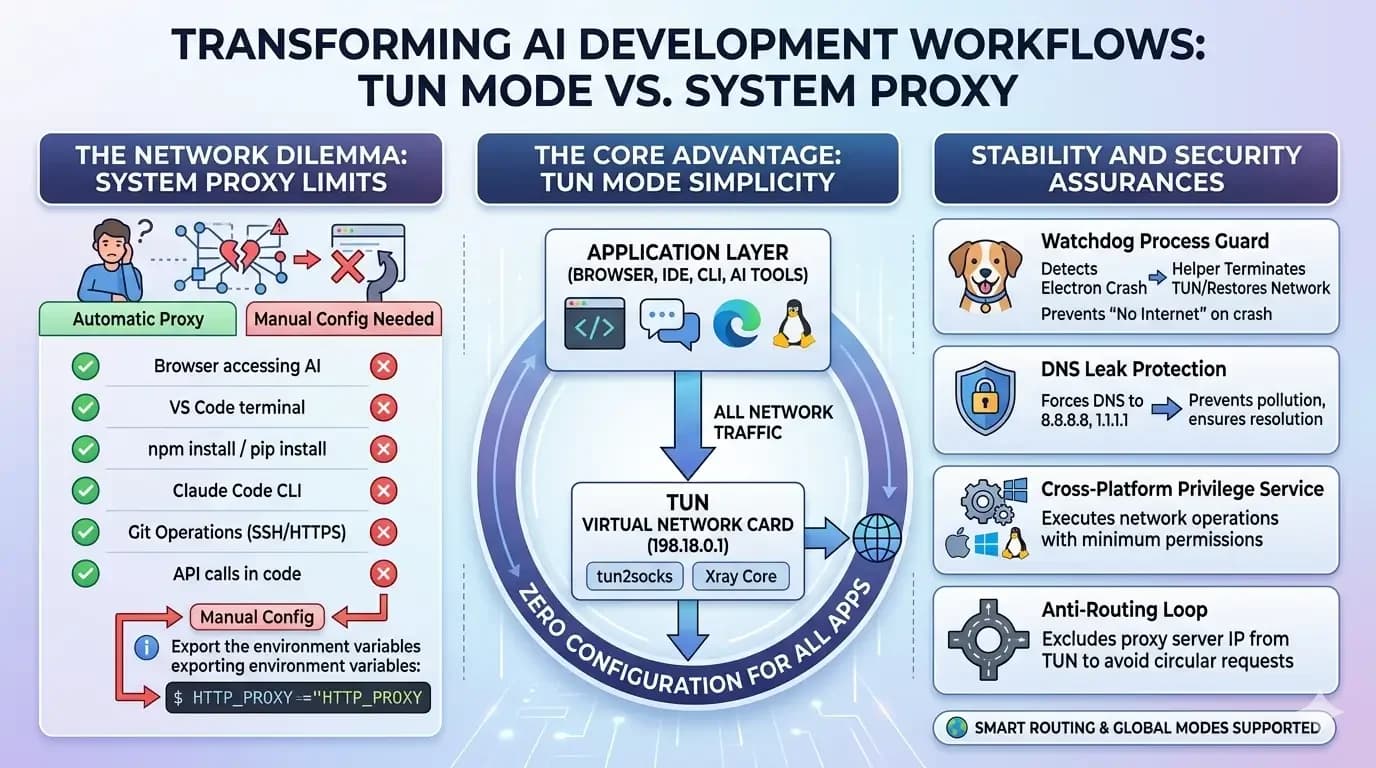
| Scenario | Automatically Routed Through Proxy? |
|---|---|
| Browser accessing ChatGPT | Yes |
| VS Code built-in browser | Yes |
Terminal running npm install | No, requires manual HTTP_PROXY setup |
| Claude Code CLI | No, requires manual environment variable configuration |
| IDE built-in AI completion | Uncertain, depends on implementation |
pip install / cargo build | No |
Developers are forced to repeatedly configure HTTP_PROXY, HTTPS_PROXY, ALL_PROXY and other environment variables, or even set up proxy parameters individually for each tool. This is not only tedious but also highly error-prone——forgetting to configure a single terminal window can lead to connection timeouts and dependency installation failures.
2. Core Advantages of TUN Mode
TUN (Tunnel) mode creates a virtual network adapter at the system level, intercepting all traffic at the lowest layer of the network stack, fundamentally solving the problems described above.
┌─────────────────────────────────────────────┐
│ Application Layer (Browser/Terminal/IDE/AI Tools) │
│ ChatGPT Claude Code npm pip Cursor │
└──────────────────┬──────────────────────────┘
│ All Traffic
▼
┌──────────────────────────────────────────────┐
│ TUN Virtual NIC (198.18.0.1) │
│ tun2socks → SOCKS5 Proxy │
└──────────────────┬───────────────────────────┘
│
▼
┌──────────────────────────────────────────────┐
│ Xray Proxy Core (Smart/Global Routing) │
└──────────────────────────────────────────────┘
With TUN mode enabled, terminals, IDEs, and AI tools require zero additional configuration to automatically route traffic through the proxy.
"Captures all network traffic — terminals, IDEs, and AI tools need no extra configuration"
3. Specific Benefits for AI Development Workflows
3.1 Claude Code / Cursor and Other AI CLI Tools: Zero-Config Ready
Previously, when using Claude Code, users had to:
# Before: Set up every time you open a terminal
export HTTP_PROXY=http://127.0.0.1:7890
export HTTPS_PROXY=http://127.0.0.1:7890
claude # Only then could it connect
With TUN mode:
# Now: Just use it, no extra steps needed
claude # Automatically routed through proxy, instant connection
3.2 AI Model API Calls: Seamless Development and Testing
When developing applications with OpenAI, Anthropic, and other APIs, there is no longer any need to hardcode proxy configurations or inject proxy variables into the runtime environment. TUN mode automatically routes requests from fetch, axios, httpx, and other HTTP clients at the operating system level.
3.3 Package Managers and Dependency Downloads: No More Timeouts
npm install, pip install, cargo build, go get and other commands are all automatically routed through the proxy under TUN mode, eliminating dependency installation failures and prolonged wait times caused by network connectivity issues.
3.4 Git Operations: Push and Pull with Ease
git clone, git push, git pull and other SSH/HTTPS Git operations are fully covered by TUN, with no need to configure a proxy for Git separately.
4. Stability Safeguards
TUN mode deeply integrates with the system network stack. If handled improperly, it can cause a complete loss of internet connectivity. We ensure stability through the following mechanisms:
4.1 Anti-Routing Loop
Proxy server IP → Original gateway (bypasses TUN)
Direct-connect IPs → Original gateway (bypasses TUN)
0.0.0.0/1 → TUN (proxies all other traffic)
128.0.0.0/1 → TUN
The proxy server's own traffic is excluded from TUN, preventing a "proxy proxying itself" infinite loop.
4.2 Watchdog Process Guardian
The privileged helper process includes a built-in Watchdog mechanism that checks every 5 seconds whether the Electron main process is alive. If the main process crashes or is unexpectedly killed, the Watchdog automatically performs cleanup:
- Removes TUN routing rules
- Restores original DNS configuration
- Terminates the tun2socks process
- Restores the system network to its normal state
Even if the application crashes, the user's internet connectivity is never disrupted.
4.3 DNS Leak Protection
TUN mode forces DNS queries to route through 8.8.8.8 and 1.1.1.1, preventing DNS resolution pollution or leaks caused by local ISP routing, ensuring that AI tools can correctly resolve domains such as api.openai.com and api.anthropic.com.
4.4 Cross-Platform Privileged Helper Services
| Platform | Implementation | IPC Channel |
|---|---|---|
| macOS | Privileged helper process (launchd) | Unix Socket (/var/run/sulian-helper.sock) |
| Windows | Windows Service (SulianHelper) | Named Pipe (\\.\pipe\sulian-helper) |
| Linux | pkexec privilege escalation | Direct process management |
Each platform uses an independent privileged service to perform network operations. The main process itself does not require elevated privileges, adhering to the principle of least privilege.
4.5 Graceful Error Recovery
When TUN fails to start (e.g., Helper not installed), the system will:
- Automatically detect the error type (
"helper service","Access is denied", etc.) - Trigger a Helper installation guidance dialog
- Guide the user through one-click privileged service installation
- Automatically retry the connection after installation completes
5. Smart Routing and Global Routing
TUN mode supports two routing strategies:
- Global Proxy: All traffic is routed through the proxy, ideal for scenarios requiring maximum AI service stability
- Smart Split Routing: Domestic domains/IPs connect directly while overseas traffic goes through the proxy——ensuring AI tool accessibility without affecting domestic service speeds
6. Technical Implementation Details
Startup Flow
1. Extract proxy server IP from Xray configuration
↓
2. Resolve domain to IP (prevent routing loops)
↓
3. Detect system default gateway and local NIC
↓
4. Initialize platform privileged service
- macOS: Privileged helper / osascript fallback
- Windows: Windows Service
- Linux: tun2socks direct process management
↓
5. Create TUN virtual NIC (198.18.0.1)
↓
6. Configure split routing rules
- Proxy server IP → Original gateway
- Direct-connect IPs → Original gateway
- 0.0.0.0/1 + 128.0.0.0/1 → TUN
↓
7. Configure DNS (8.8.8.8, 1.1.1.1)
↓
8. Start Watchdog process guardian
Key Components
| Component | Purpose |
|---|---|
| tun2socks | Forwards TUN NIC traffic to SOCKS5 proxy |
| wintun.dll | Windows TUN driver (from WireGuard) |
| sulian-helper | Cross-platform privileged helper service (written in Go) |
| Xray | Proxy core with multi-protocol and smart routing support |
7. Summary
| Dimension | System Proxy Mode | TUN Mode |
|---|---|---|
| Browser | Automatic | Automatic |
| Terminal / CLI | Manual configuration required | Automatic |
| AI Tools (Claude Code, etc.) | Manual configuration required | Automatic |
| IDE AI Completion | Uncertain | Automatic |
| Package Managers | Manual configuration required | Automatic |
| Git SSH/HTTPS | Manual configuration required | Automatic |
| Network Recovery After Crash | N/A | Watchdog Auto-Recovery |
| DNS Leak Protection | None | Yes |
The TUN mode transformation essentially pushes the burden of "proxy configuration" — a long-standing pain point for developers — from the application layer down to the operating system layer. For modern development workflows that increasingly rely on AI tools, TUN mode is not a nice-to-have; it is a true infrastructure-level improvement——freeing developers to focus on coding and creating, rather than endlessly troubleshooting "why can't I connect."