
1. How to Download TongbaoVPN for Windows
Q: Where can I safely download the TongbaoVPN Windows client?
A: Visit the official TongbaoVPN website at https://www.tongbaovpn.com/download. The page will automatically detect your Windows system and provide the
A: Visit the official TongbaoVPN website at https://www.tongbaovpn.com/download. The page will automatically detect your Windows system and provide the
.exe installer.Handling Browser Security Prompts
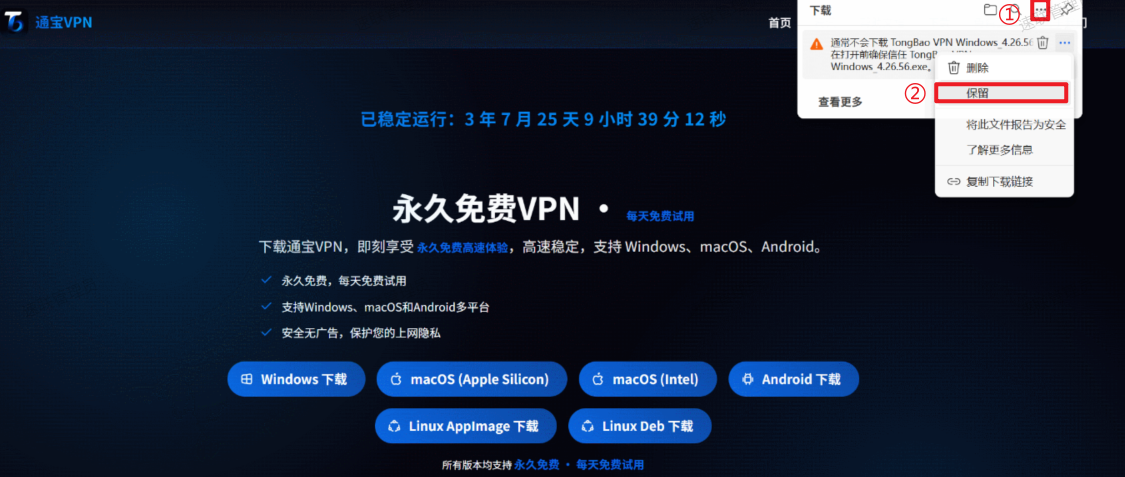
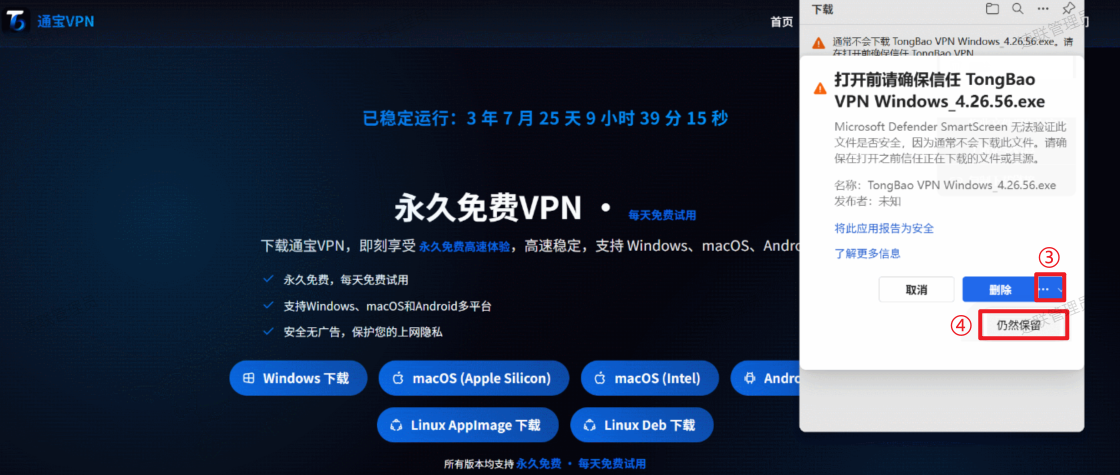
Q: What should I do if my browser warns that "this file is from an unknown source and may be risky"?
A: This is a standard prompt from Windows Defender and Edge / Chrome for unsigned
A: This is a standard prompt from Windows Defender and Edge / Chrome for unsigned
.exe files. The TongbaoVPN installer has been verified with Microsoft's latest code signing, so you can proceed with confidence.| Browser | What to Do |
|---|---|
| Edge | Click "Keep file" → "Show more details" → "Keep anyway". |
| Chrome | In the bottom download bar, click "Keep dangerous file" → "Keep anyway". |
| Win11 Security Center | Click "More info" → "Run anyway". |
⚠️ Note: After the download completes, if your system still displays "Windows protected your PC", click "More info" → "Run anyway" to proceed with the installation.

2. How to Install TongbaoVPN
Q: What should I keep in mind during installation?
A: The entire installation takes about 1 minute. Follow these steps:
A: The entire installation takes about 1 minute. Follow these steps:
| Step | Instructions |
|---|---|
| ① Run the installer | Double-click the downloaded TongBaoVPN Windows.exe |
| ② Grant permissions | Click "Yes" to allow the installation |
| ③ Choose install path | Use the default path or select a custom installation location |
| ④ Finish installation | Click "Finish" and check "Create desktop shortcut" (recommended) |
3. First-Time Registration & Login
Q: What if I don't have an account?
A: When you first launch the TongbaoVPN client, you can start a free trial immediately -- no registration required. Once you're satisfied with the service, clicking "Renew" will automatically redirect you to the registration page where you can sign up and purchase a plan.
A: When you first launch the TongbaoVPN client, you can start a free trial immediately -- no registration required. Once you're satisfied with the service, clicking "Renew" will automatically redirect you to the registration page where you can sign up and purchase a plan.
4. How to Connect to VPN
Q: What if the connection fails?
A: After your first login, the system will automatically recommend the best server node. You can also manually select a node (such as Japan, Singapore, or the United States) and click "One-Click Connect" to get started.
A: After your first login, the system will automatically recommend the best server node. You can also manually select a node (such as Japan, Singapore, or the United States) and click "One-Click Connect" to get started.
5. Frequently Asked Questions (FAQ)
| Question | Solution |
|---|---|
| Installation failed? | Check if your antivirus software is blocking the installer. Try disabling it temporarily and retry. |
| No internet after connecting? | Try switching to a different server node or restarting the client. |
| How many devices per account? | Up to 6 devices can be connected simultaneously without affecting each other. |
| How to renew my subscription? | Click your avatar in the top-right corner of the client → "Membership Center" → select a plan and pay. |
6. Customer Support
Q: How do I contact support if I have an issue?
A: TongbaoVPN offers 24/7 customer support in both Chinese and English through the following channels:
A: TongbaoVPN offers 24/7 customer support in both Chinese and English through the following channels:
-
In-app "Live Chat" support
-
Telegram group: https://t.me/tongbaovpn
-
Twitter DM: @TongbaoVPN