

In the 2026 AI-collaborative development landscape, the Agent capabilities of Claude 4.5 demand exceptional network stability. Many users find that while the web version of Claude works perfectly after connecting to Tongbao VPN, command-line tools (Terminal/Command Prompt) or IDE plugins still return "Connection Timeout" errors.
This occurs because system terminals do not inherit proxy settings from graphical user interfaces by default. This guide will walk you through configuring environment variables to ensure your development environment is perfectly optimized for Claude 4.5.
1. Retrieve Tongbao VPN Local Proxy Parameters
Before configuring your terminal, ensure the Tongbao VPN client is connected and verify the following parameters:
-
Local Address (Server):
127.0.0.1 -
Port: Default is
15556(Please verify in the Tongbao VPN client under "Personal Center" -> "Current Port"). -
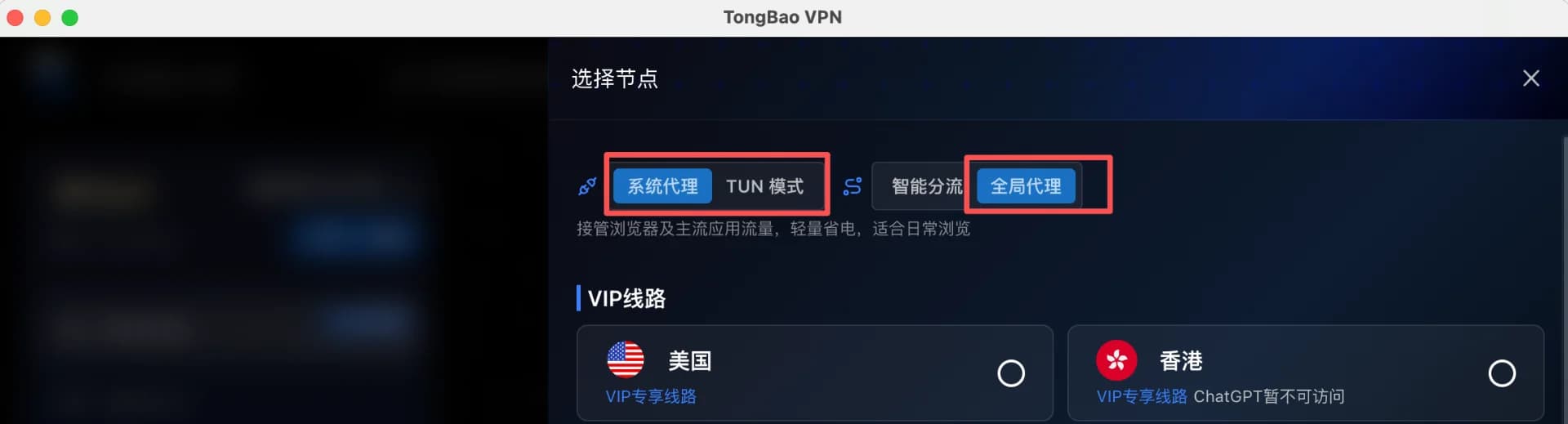
Enable Global Proxy: Enable "Global Proxy" mode or turn on "TUN Mode."
2. Windows Configuration Guide
Select the appropriate commands based on your preferred terminal tool.
Option 1: Using PowerShell (Recommended)
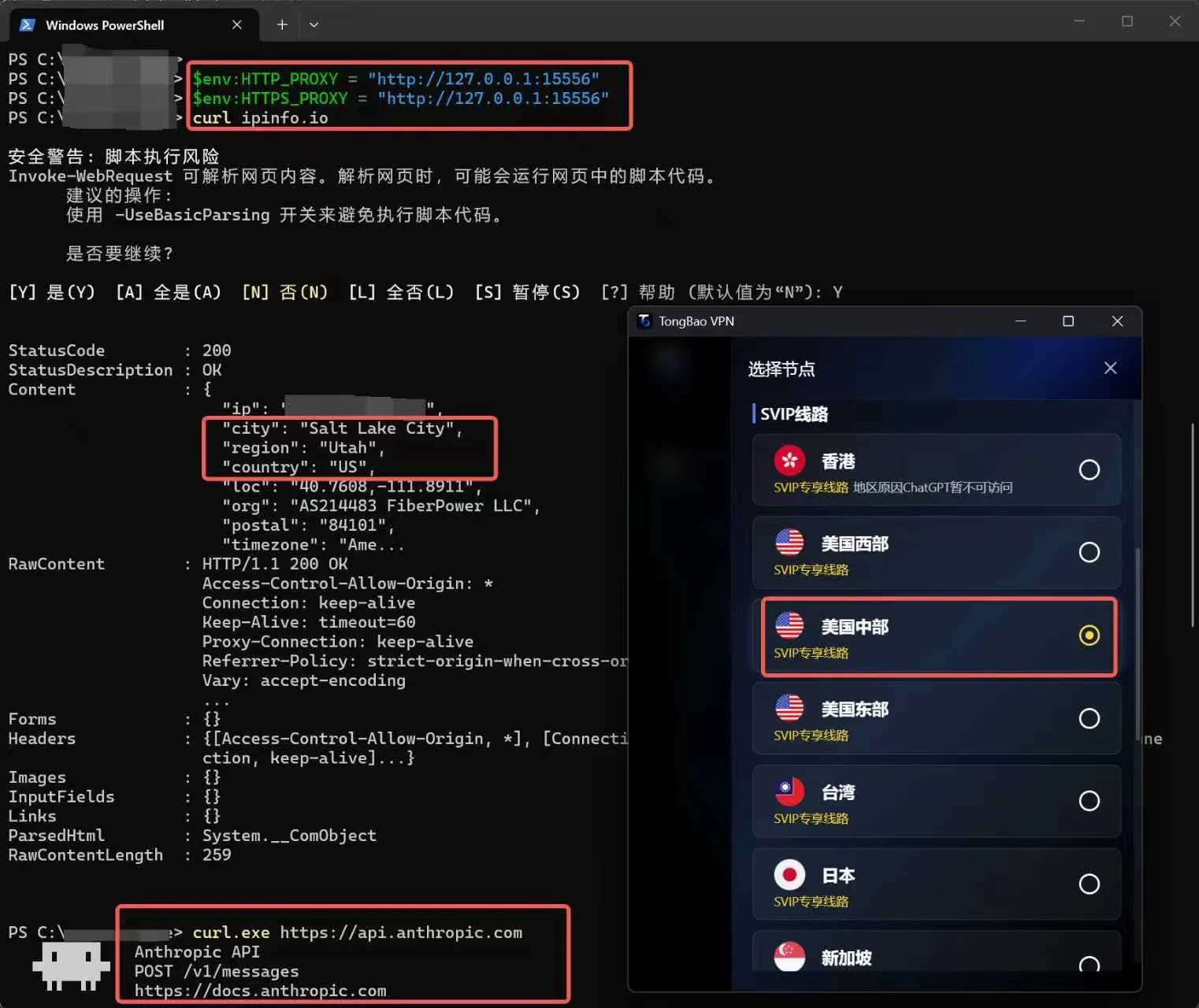
Execute the following commands in the PowerShell window to apply the proxy to the current session:
$env:HTTP_PROXY = "http://127.0.0.1:15556"
$env:HTTPS_PROXY = "http://127.0.0.1:15556"
Option 2: Using CMD (Command Prompt)
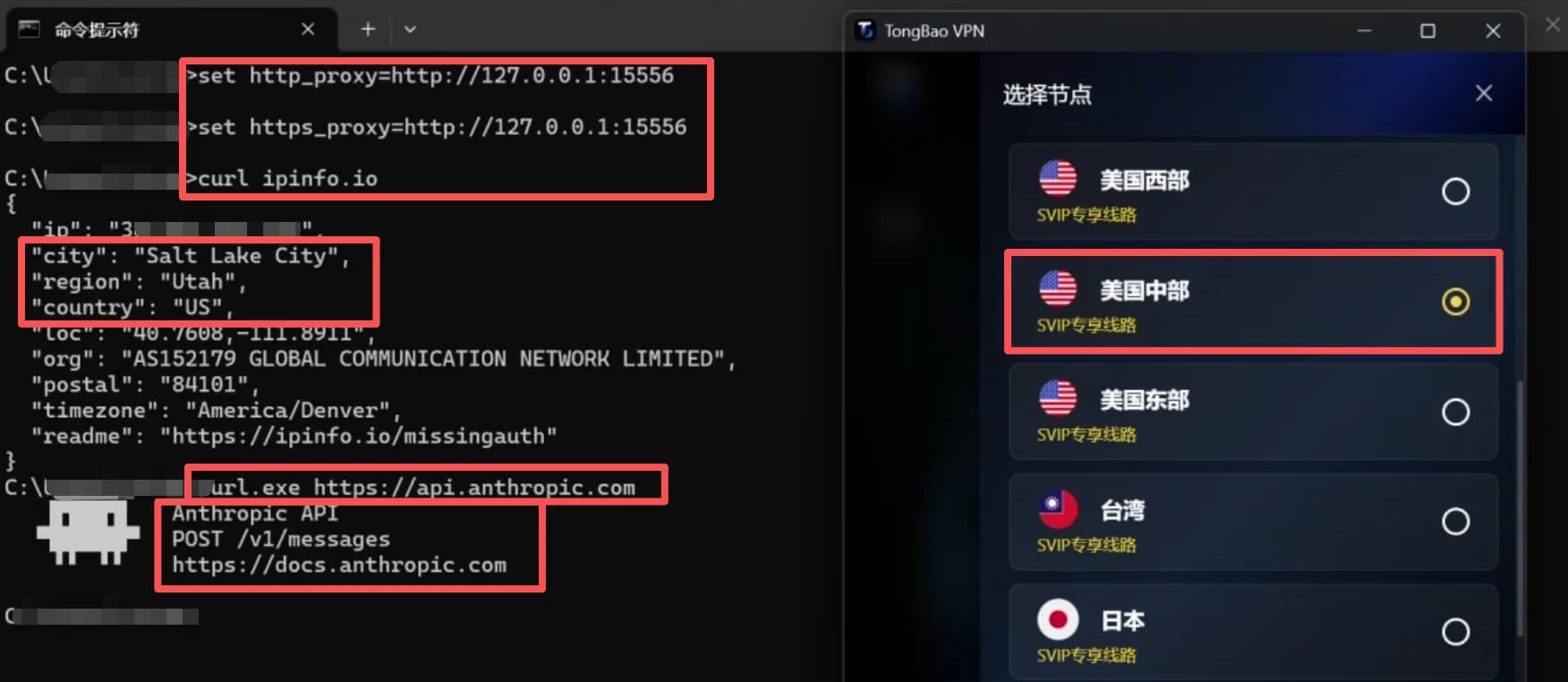
In the CMD window, enter the following commands:
set http_proxy=http://127.0.0.1:15556
set https_proxy=http://127.0.0.1:15556
3. Mac / Linux Configuration Guide
macOS uses Zsh by default. Use the following logic for configuration:
1. Temporary Setting (Current Window Only)
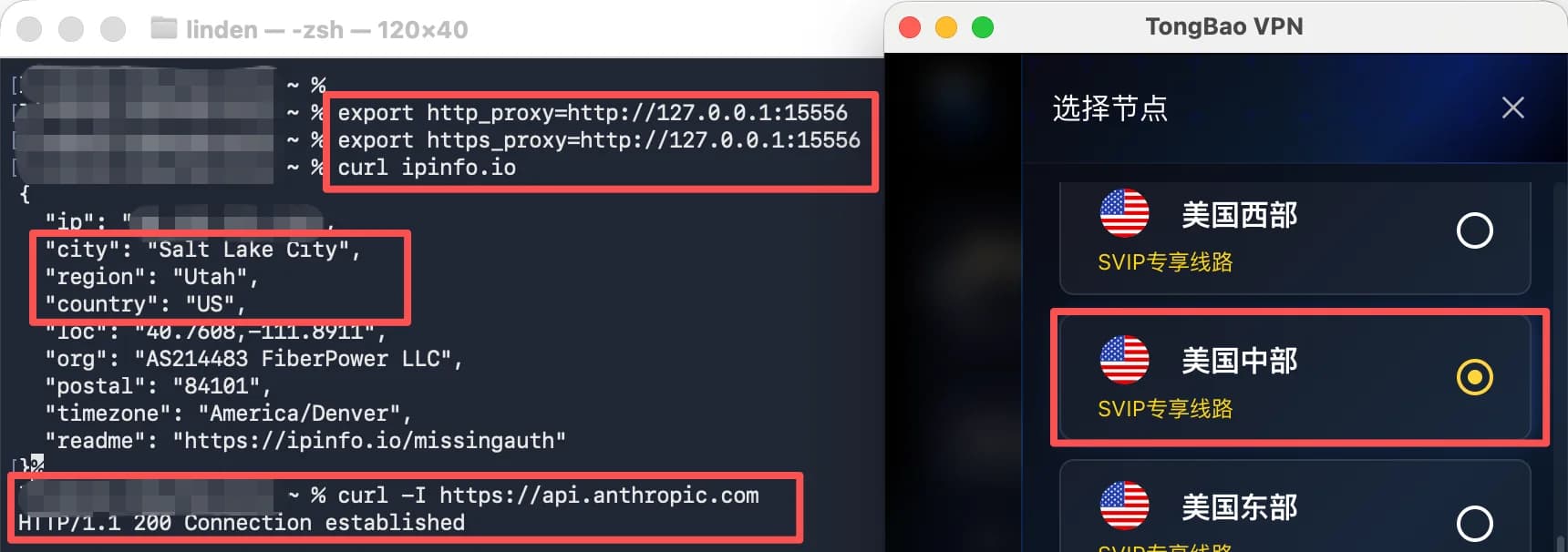
Execute directly in the terminal:
export http_proxy=http://127.0.0.1:15556
export https_proxy=http://127.0.0.1:15556
2. Permanent Setting (Recommended for Developers)
To automatically enable the proxy every time you open the terminal:
-
Run
nano ~/.zshrc. -
Add the two
exportlines mentioned above to the end of the file. -
Press
Ctrl+Oto save,Ctrl+Xto exit, then runsource ~/.zshrc.
4. Connectivity Verification (Critical Step)
After configuration, perform these steps to verify the network link for Claude 4.5:
-
IP Location Check: Run
curl ipinfo.io.-
Confirm the
countryfield is "US" (or matches your selected server region).
-
-
Claude API Handshake Test:
-
macOS: Run
curl -I https://api.anthropic.com. If you receiveHTTP/1.1 200 OKor401 Unauthorized, the connection is successful.
-

-
-
Windows: Run
curl.exe https://api.anthropic.com. If you see the official Anthropic "Pixel Monster" ASCII art, the connection is successful.
-

5. FAQ for Claude 4.5 Features
1. Encountering SSL errors while running Claude Code? Due to the encrypted nature of proxy software, the Node.js environment (which powers Claude Code) may throw certificate validation errors. If this happens, run the following command before your main instruction to temporarily skip validation: export NODE_TLS_REJECT_UNAUTHORIZED=0
2. Why is GitHub push still slow after setting the proxy? Git has its own independent network configuration. If git push remains slow, set a specific proxy for Git in your terminal: git config --global http.proxy http://127.0.0.1:15556
Official Recommendations: Line Selection & Risk Mitigation
For the best real-time interaction and Agent automation experience with Claude 4.5, it is highly recommended to stay on the same regional line during development and avoid frequent switching.
-
SVIP Regional Optimization: The Tongbao VPN SVIP line list is categorized into specific regions: US-Central, US-West, and US-East.
-
Intra-city Connection: When you select a specific SVIP regional node (e.g., "US-Central"), all traffic is locked to data centers within the same city. This "Same-city Dynamic IP" simulates a realistic remote work environment, significantly reducing account risks triggered by large physical jumps in IP location.
-
Note on VIP Lines: In the Tongbao VPN VIP line list, US regions are not subdivided. Connecting may result in random IP assignments across different states or cities. Such "cross-region jumps" are easily flagged as suspicious logins by the Claude 4.5 risk management system. Therefore, for AI coding and high-value account scenarios, we strongly advise using SVIP partitioned lines.
Summary: Maintaining geographical consistency is the primary duty in protecting your Claude 4.5 account assets. Lock into an SVIP intra-city line to ensure your AI Agent runs stably.