
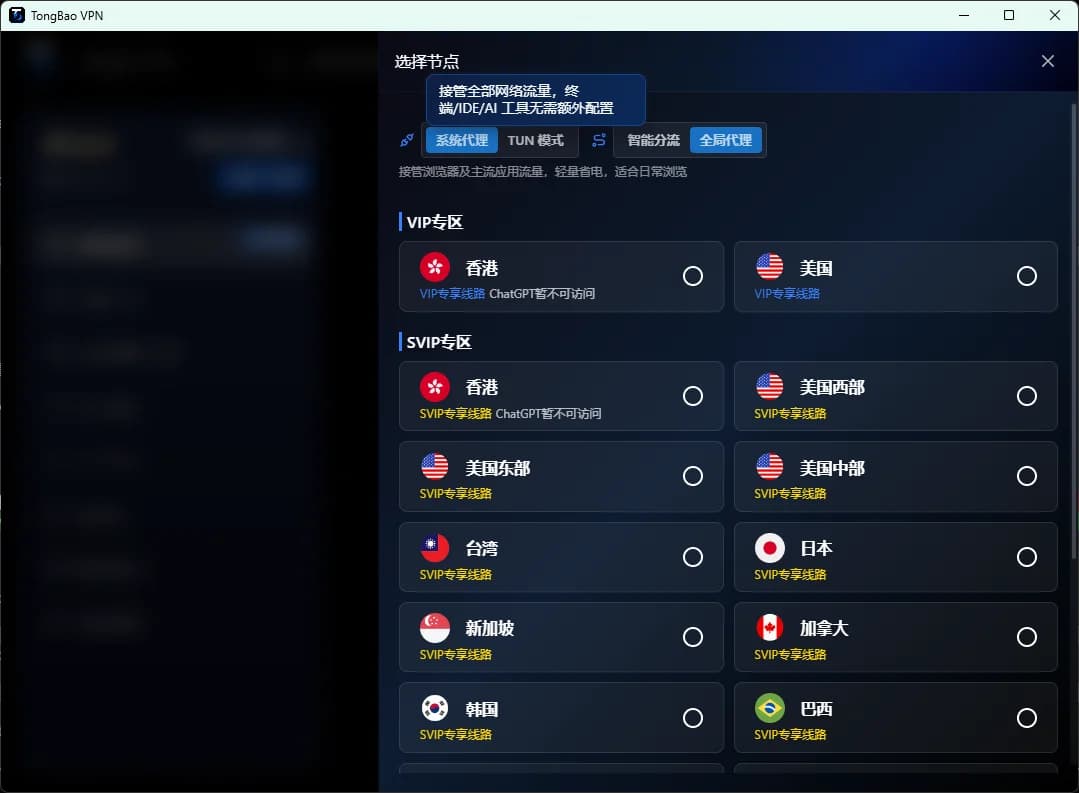
Why Are "Stability" and "TUN Mode" Both Essential for an AI VPN?
In 2026, AI tools have fully penetrated daily work. Developers rely on GitHub Copilot and Cursor to write code, product managers use ChatGPT and Claude to draft PRDs, designers generate images with Midjourney. But these tools' servers are almost all deployed overseas, and the stability and completeness of your network connection directly determine productivity. A qualified AI VPN must satisfy two conditions simultaneously: stable enough connection (no drops, no timeouts) and complete enough proxying (every app accelerated, not just the browser). That's exactly where TUN mode shines — and what makes TongbaoVPN stand out.
The AI VPN Landscape: Why Most Accelerators Can't Meet AI Needs
Inherent Flaws of System Proxy
Most accelerators on the market operate in system proxy mode. The principle is simple: modify the operating system's proxy settings to forward HTTP/HTTPS traffic to a proxy server. The problems:
- Limited coverage: Only apps that "respect" system proxy settings get accelerated. Many development tools (terminal CLIs, Docker, some IDE plugins) don't read system proxy config by default
- Protocol limitations: System proxies usually only handle HTTP/HTTPS traffic. UDP, WebSocket and other protocols bypass the proxy entirely
- DNS leaks: Under system proxy, DNS queries often resolve through the local ISP, exposing your real geographic location to target services
The Even Bigger Limitations of Browser Extensions
Some accelerators come as browser extensions, with even narrower coverage — they can only accelerate web browsing inside the browser. For AI developers needing to call AI APIs from IDEs, terminals and containers, browser extensions are completely useless.
The Truth About "Global Proxy" Claims
Some accelerators claim to support "global mode", but in reality they just configure the system proxy as a global HTTP proxy. At its core it's still system proxy, not genuine global routing. Only TUN mode, which operates at the bottom of the network stack, achieves true global traffic interception.
Deep Dive on TUN Mode: TongbaoVPN's Technical Foundation
How TUN Mode Works
TUN (network TUNnel) is a virtual network device interface provided by the operating system. TongbaoVPN uses the TUN interface to create a virtual network card at the system kernel layer. All outbound network traffic — regardless of app or protocol — is routed to this virtual NIC, then transmitted through TongbaoVPN's encrypted tunnel to the target server.
This is OS-level global traffic interception, completely independent of whether any application supports proxy configuration. In short:
- TongbaoVPN creates a TUN virtual NIC in the system kernel
- Modifies the system routing table to point the default route at the TUN NIC
- All outbound traffic from all apps (TCP/UDP/ICMP/DNS) enters the TUN NIC
- TongbaoVPN's client encrypts, encapsulates, and transmits the traffic
- The TongbaoVPN node server decrypts and forwards it to the target address
Why TongbaoVPN Embeds TUN Natively
Implementing kernel-level TUN mode has a high technical bar:
- High multi-platform cost: Windows needs TAP/Wintun drivers, macOS needs the NetworkExtension framework, iOS needs NEPacketTunnelProvider, Android needs the VPNService API. Every platform has a completely different implementation path
- Strict permissions and signing: iOS NetworkExtension requires special Apple approval, and Android VPNService permissions require strict purpose declarations in the Play Store
- Difficult stability tuning: TUN mode operates at the kernel layer. Any bug can render device networking completely unusable, demanding extremely high QA standards
- Smart routing complexity: After global interception, you need intelligent judgment about which traffic goes through the accelerator and which goes direct, requiring a live-updated routing rule database
TongbaoVPN has invested significant R&D resources to tackle these challenges, and is among the AI accelerators that natively embed TUN mode across all platforms (Windows/macOS/iOS/Android).
AI Development Benchmarks: TongbaoVPN TUN Mode vs. System Proxy
To illustrate TUN mode's advantages, we ran comparison tests under the same network environment (500M broadband):
| Test Scenario | TongbaoVPN (TUN Mode) | Mainstream Accelerator (System Proxy) | Difference |
|---|---|---|---|
| ChatGPT web chat latency | 80-120ms | 100-200ms | Both accelerate browser traffic |
| Cursor IDE AI completion response | 50-80ms | Timeout/Fail | Cursor doesn't use system proxy, needs TUN |
CLI curl to OpenAI API | 60-100ms | Cannot connect | Terminal ignores system proxy by default |
| Docker Python calling Claude API | 70-110ms | Cannot connect | Container networks don't inherit system proxy |
GitHub git clone large repo | 8-15 MB/s | 0.5-2 MB/s or fail | Git SSH doesn't use HTTP proxy |
| pip install large ML library | 10-20 MB/s | 1-3 MB/s | pip requires manual proxy config |
| Hugging Face model download | 12-25 MB/s | Cannot connect or extremely slow | git-lfs doesn't use system proxy |
| YouTube 4K playback | Smooth / zero buffering | Smooth | Video stream via browser, both work |
Conclusion: For ordinary browser-based web access, TUN mode and system proxy aren't much different. But the moment AI development toolchains (IDEs, terminals, containers, package managers) are involved, TUN mode's global routing capability is irreplaceable.
TongbaoVPN's Cross-Platform TUN Implementation
Windows
On Windows, TongbaoVPN implements TUN virtual networking using the Wintun driver. Wintun is an open-source high-performance TUN driver from the WireGuard team — over 3x faster than the legacy TAP-Windows driver, and installation requires no system reboot. The client runs as a Windows service with auto-start at boot and tray-icon shortcuts.
macOS
macOS TongbaoVPN is built on Apple's NetworkExtension framework, using NEPacketTunnelProvider for kernel-level tunneling. This is Apple's officially recommended approach to VPN development, ensuring deep macOS integration without triggering security warnings or compatibility issues.
iOS
iOS is also based on NEPacketTunnelProvider and has passed Apple's Network Extension approval. All network traffic is encrypted and tunneled at the iOS layer. Even when switching between Wi-Fi and cellular, connections don't drop (thanks to iOS's includeAllNetworks configuration).
Android
The Android version implements TUN mode via the system VPNService API, Android's native VPN development interface. It creates a TUN virtual NIC and takes over global traffic. TongbaoVPN's Android client is specially optimized against vendor battery-saving policies, keeping background operation stable without being killed by the system.
Stable Connection Mechanisms
TUN mode alone isn't enough — "stability" is the other hard requirement for AI workflows. TongbaoVPN maintains long-term connection stability through the following mechanisms:
Multi-Line Redundancy and Smart Switching
TongbaoVPN operates multiple dedicated lines globally, covering Hong Kong, Japan, Singapore, the US, and other major node regions. The built-in smart scheduling engine continuously monitors latency and packet loss on each line. When current line quality degrades, it switches in milliseconds. For in-flight TCP connections, session persistence technology enables imperceptible migration.
Keep-Alive and Auto-Reconnect
The client and server maintain a heartbeat mechanism to monitor connection state in real time. If an anomaly is detected (Wi-Fi switch, transient network outage), the client auto-reconnects within 1-3 seconds without user intervention. This is crucial for long-running AI tasks like Claude analyzing large documents or ChatGPT generating long text.
Interference-Resistant Protocol Stack
TongbaoVPN's protocol stack is specifically designed to maintain stable transmission under complex network environments. Multiple protocols are automatically matched to the network environment — users don't need to understand protocol details, the client chooses the best transport scheme for the current environment.
Downloading TongbaoVPN: Three Steps to AI Acceleration
- Visit the official website: Go to TongbaoVPN's official site and download the client for your platform (Windows / macOS / iOS / Android). iOS users can also search "Tongbao VPN" in the App Store
- Register an account: Open the client, register with your email, and log in. New users get free trial traffic on signup — no payment method required
- One-click connect: Tap "Connect" and TUN mode global routing activates automatically. Open ChatGPT, Cursor, your terminal — every tool is accelerated instantly with zero configuration
Who It's For
- AI developers: Engineers who need to call overseas AI APIs from IDEs, terminals and containers
- AI power users: Knowledge workers heavily using ChatGPT, Claude, Gemini and other tools daily
- Remote workers: Team members using Google Workspace, Slack, Notion and other global collaboration tools
- Designers and creatives: Creative workers relying on Figma, Midjourney, Runway and similar tools
- Cross-border e-commerce professionals: Business users needing stable access to overseas e-commerce platforms and social media
Conclusion: TUN Mode Is the Baseline for an AI VPN
In an era where AI tools are deeply woven into workflows, the core value of an AI VPN isn't "can it open a particular webpage", but "can it keep all your AI tools running stably". Kernel-level TUN mode global routing is the only technical path to this goal, and TongbaoVPN embeds it natively across all platform clients. Whether you're an AI developer, knowledge worker or creative professional, TongbaoVPN is the best network infrastructure for unlocking your AI productivity. Download now and experience AI acceleration.